

Introduction
NetX is a Digital Asset Management application that empowers users to store, manage, and distribute their digital assets. You can use our API to access assets, folders, attribute data, collections, and views.
Getting started
JSON-RPC
Our API adheres to the JSON-RPC 2.0 spec (http://www.jsonrpc.org/specification) with a few exceptions; we do not yet support named parameters or batched calls.
From the spec: An RPC call is represented by sending a request object to a server. The request object has the following members:
- jsonrpc: A string specifying the version of the JSON-RPC protocol. MUST be exactly "2.0".
- method: A string containing the name of the method to be invoked. Method names that begin with the word rpc followed by a period character (U+002E or ASCII 46) are reserved for rpc-internal methods and extensions and MUST NOT be used for anything else.
- params: A structured value that holds the parameter values to be used during the invocation of the method. This member MAY be omitted.
- id: An identifier established by the client that MUST contain a string, number, or NULL value if included. If it is not included it is assumed to be a notification. The value SHOULD normally not be Null [1] and Numbers SHOULD NOT contain fractional parts [2]
Parameters and request options
{
    "id":"13576991614322",
    "method":"getAssetsByFolder",
    "params":[
        12,
        false,
        {
            "page": {
                "startIndex": 0,
                "size": 2
            },
            "data": ["asset.id", "asset.base"]
        }
    ],
    "jsonrpc":"2.0"
}
Many of the methods in the API have an options parameter that allows you to specify pagination, sorting, and a list of data included in the return objects. For all of the code examples in this documentation, we will use a page size of 1 or 2 to save space. Here is an example of the getAssetsByFolder method illustrating the use of parameters and their options:
This indicates that we want assets from folder id 8 (the Castles folder), we don't want assets from subfolders (recursive = false, the 3rd parameter), and that we want paging to start with the first object (startindex = 0), and include 2 items. The data option indicates that all we want are the asset id and the name (asset.id and asset.base).
sort * field specifies the field you want to sort on. * order specifies a descending or ascending sort order.
page * size specifies the number of items included in the response. * startIndex specifies the first object in the page.
data * This option specifies the data you want returned in the response. You can choose any combination of data options, and the API will only return the data you have selected. As we continue to extend the API, additional fields will be added. For each method, we will list the current data options throughout this documentation.
Not all options are available for every method, please see the particular method for documentation on which options you can use.
Endpoint
The endpoint URL for the JSON-RPC API on your site is:
https://<sitename>/api/rpc
API request objects are POSTed to this URL, and response objects are returned. You must use the HTTP POST verb. You cannot use GET to invoke JSON-RPC methods in the NetX API.
Authentication
The authentication mechanism for this API is via the Authorization header. An existing NetX user may generate an API token in the NetX UI, which can be used to make API method calls. The format of the Authorization header for all methods in this API is:
Authorization: apiToken <netx_api_token>
This header must be sent on every request to the API, including JSON-RPC calls, file import requests, and file retrieval requests.
If the API token isn't valid, or the request doesn't contain the Authorization header, the result will be a 401 response code.
API Tokens
Only users that are members of the group approved for API access can create tokens. Please contact your administrator for more information.
Creating an API Token
- Click the User menu in the upper left corner and choose Integrations.
- Click the plus button to add an API token. When prompted, enter the name of the app or integration your token will be used for, and click Submit.
- Your token will be generated, then presented to you in the next dialog. Make sure you copy the token; you will never see it again after closing the window.
- To close the window, confirm Yes I saved my token.
Editing an API Token
The token name can be edited by clicking the Edit button once the token's display card has been expanded.
Revoking access
To revoke access to a third-party application or token, click on the application name to expand the listing. Click Revoke access, then click Revoke when prompted to confirm. If your access to the API has been disabled by an administrator, you will see an option to Remove the token, which will effectively do the same thing.
OAuth 2
It is possible to generate API tokens via OAuth 2 following the OAuth two step process of authenticating in the NetX application and then granting access, which generates an authorization code, and then using that code to get a token.
You will need the following information to authenticate using NetX Oauth:
| Parameter | Description |
|---|---|
| Client ID | This is a string NetX will provide to you. It represents your App identifier. |
| Scope | This is a string NetX will provide to you. It is paired with your Client ID. |
| Redirect URL | This is the callback URL where you will receive authorization codes |
Step 1 - Authenticate and Grant Access
Your application must redirect to your NetX instance with the following URL:
https://<sitename>/app?response_type=code&client_id=<clientid>&redirect_uri=https://you.com&state=abc123&scope=<scope>#access/<scope>
| Parameter | Description |
|---|---|
| response_type | This MUST be set to "code" |
| client_id | Your Client ID, given to you by NetX (see above) |
| redirect_uri | This is your callback URL where the authorization code will be sent once the user grants access to your application |
| state | This is a value that you provide. It will be returned with the authorization code, and should be used by your application to verify the response and match it to a request. This should be a unique value for every call. |
| scope | This MUST be set to "api", unless you are developing a dedicated integration in which case NetX will provide you a value that is paired with your custom Client ID. |
Once the user has granted access, NetX will redirect to the callback
https://<redirect_uri>?code=SplxlOBeZQQYbYS6WxSbIA&state=abc123
| Parameter | Description |
|---|---|
| code | This is the authorization code that you will exchange for an access token in Step 2. This code has a 10 minute expiration time. |
| state | This is the state value that you provided earlier. The value should match the value that you sent, or it should be discarded. |
Step 2 - Exchange authorization code for access token
Once you have received an authorization code, you can exchange it for an access token and a refresh token. To do this, you must POST to the following URL:
https://<sitename>/a/t
With the following x-www-form-urlencoded form fields:
| Parameter | Description |
|---|---|
| grant_type | This must be set to "authorization_code" |
| code | This is the authorization code you received in Step 1 |
If the code is valid and not expired, you will receive a response containing a JSON object
{
    "access_token": "2YotnFZFEjr1zCsicMWpAA",
    "refresh_token": "tGzv3JOkF0XG5Qx2TlKWIA",
    "expires_in": 86400,
    "token_type": "api"
}
The access token can be now be used in a NetX API call by sending it in an Authorization header, as described above:
Authorization: apiToken 2YotnFZFEjr1zCsicMWpAA
If the token has expired and you have a refresh token, you can use the refresh token to get a new access token by POSTing to the same URL:
https://<sitename>/a/t
With the following x-www-form-urlencoded form fields:
| Parameter | Description |
|---|---|
| grant_type | This must be set to "refresh_token" |
| refresh_token | The refresh token you received alongside the access token |
If the refresh token is valid, you will receive a response containing a JSON object
{
    "access_token": "c3FIOG9vSGV4VHo4QzAyg",
    "refresh_token": "Ww6WjRsanRKZG5lQk9qUE",
    "expires_in": 86400,
    "token_type": "api"
}
Postman
There is a Postman collection available here with examples of the methods in this API. The authentication mechanism used is OAuth 2.
Once you import the collection into Postman, you will need to update the collection variable netx-uri and
set it to the URI of the NetX instance you will be using.
Assets
getAssets
{
    "jsonrpc" : "2.0",
    "id" : "1234567890",
    "method" : "getAssets",
    "params":[
        [17901, 17902, 17903],
        {
            "data": [
                "asset.base",
                "asset.file"
            ]
        }
    ]
}
{
    "result": [
        {
            "id": 17901,
            "name": "javier-haro-ZOcW67YXtRY-unsplash",
            "fileName": "javier-haro-ZOcW67YXtRY-unsplash.jpg",
            "creationDate": 1611604502000,
            "importDate": 1611604502000,
            "modDate": 1611610786000,
            "file": {
                "name": "javier-haro-ZOcW67YXtRY-unsplash.jpg",
                "size": 1009380,
                "width": 3621,
                "height": 5431,
                "checksum": "0a03c80336f972272473cfdd85ae78f8",
                "url": "/file/asset/17901"
            },
            "proxies": null,
            "views": null,
            "relatedAssets": null,
            "folders": null,
            "attributes": null
        },
        {
            "id": 17902,
            "name": "herr-bohn-Gn_FJNiH9Zo-unsplash",
            "fileName": "herr-bohn-Gn_FJNiH9Zo-unsplash.jpg",
            "creationDate": 1611611525000,
            "importDate": 1611611525000,
            "modDate": 1611684259000,
            "file": {
                "name": "herr-bohn-Gn_FJNiH9Zo-unsplash.jpg",
                "size": 2579970,
                "width": 3000,
                "height": 3882,
                "checksum": "a35333cd953278ae5b1ae14dde3b780a",
                "url": "/file/asset/17902"
            },
            "proxies": null,
            "views": null,
            "relatedAssets": null,
            "folders": null,
            "attributes": null
        },
        {
            "id": 17903,
            "name": "ryunosuke-kikuno-WGxMAt33azU-unsplash",
            "fileName": "ryunosuke-kikuno-WGxMAt33azU-unsplash.jpg",
            "creationDate": 1611691557000,
            "importDate": 1611691557000,
            "modDate": 1611691564000,
            "file": {
                "name": "ryunosuke-kikuno-WGxMAt33azU-unsplash.jpg",
                "size": 3361551,
                "width": 4024,
                "height": 6048,
                "checksum": "7954114f75f7efbb377fcd10bf1bc7af",
                "url": "/file/asset/17903"
            },
            "proxies": null,
            "views": null,
            "relatedAssets": null,
            "folders": null,
            "attributes": null
        }
    ],
    "id": "1234567890",
    "jsonrpc": "2.0"
}
Gets one or more assets using their unique identifiers
Parameters
| Parameter | Description |
|---|---|
| assetIds | Array of asset IDs |
| options | data (see data options below) |
Data options
| Option | Description |
|---|---|
| asset.id | Asset ID |
| asset.base | Asset name, creation date, import date, modification date |
| asset.file | File name, size, width, height, checksum, URL |
| asset.proxies | Info about the asset proxy files (thumbnail, preview, zoom) |
| asset.views | Info about any views attached to the asset |
| asset.relatedAssets | Info about assets related to the asset |
| asset.folders | Info about the asset's parent folders |
| asset.attributes | Attribute data for each asset |
| asset.versions | Info about asset versions |
| asset.permissions | Asset permission data |
| asset.metadata | Embedded metadata |
Access level
Returns
A list of requested asset objects
updateAsset
{
    "jsonrpc" : "2.0",
    "id" : "72038957398403",
    "method" : "updateAsset",
    "params":[
        {
            "id": 593,
            "name": "updated-via-api",
            "fileName": "updated-via-api.jpg"
        },
        {
          "data": [
            "asset.base"
          ]
        }
    ]
}
{
    "result": {
        "id": 593,
        "name": "updated-via-api",
        "fileName": "updated-via-api.jpg",
        "creationDate": 1313466823000,
        "importDate": 1582069576000,
        "modDate": 1600271644000,
        "file": null,
        "proxies": null,
        "views": null,
        "relatedAssets": null,
        "folders": null,
        "attributes": null
    },
    "id": "72038957398403",
    "jsonrpc": "2.0"
}
Updates asset filename and/or name.
Parameters
| Parameter | Description |
|---|---|
| view | An asset's writable data |
| options | data (see data options below) |
Data options
| Option | Description |
|---|---|
| asset.id | Asset ID |
| asset.base | Asset name, creation date, import date, modification date |
| asset.file | File name, size, width, height, checksum, URL |
| asset.proxies | Info about the asset proxy files (thumbnail, preview, zoom) |
| asset.views | Info about any views attached to the asset |
| asset.relatedAssets | Info about assets related to the asset |
| asset.folders | Info about the asset's parent folders |
| asset.attributes | Attribute data for each asset |
| asset.versions | Info about asset versions |
| asset.permissions | Asset permission data |
| asset.metadata | Embedded metadata |
Access level
Returns
The updated asset object.
getAssetsByFolder
{
    "id":"13576991614322",
    "method":"getAssetsByFolder",
    "params":[
        12,
        false,
        {
            "page": {
                "startIndex": 0,
                "size": 2
            },
            "data": ["asset.id", "asset.base"]
        }
    ],
    "jsonrpc":"2.0"
}
{
    "result": {
        "results": [
            {
                "id": 39,
                "name": "Alcázar de Segovia",
                "file": null,
                "proxies": null,
                "views": null
            },
            {
                "id": 40,
                "name": "Alnwick Castle",
                "file": null,
                "proxies": null,
                "views": null
            }
        ],
        "size": 62
    },
    "id": "13576991614322",
    "jsonrpc": "2.0"
}
{
    "id":"13576991614322",
    "method":"getAssetsByFolder",
    "params":[
        12,
        false,
        {
            "page": {
                "startIndex": 2,
                "size": 2
            },
            "data": ["asset.id", "asset.base", "asset.file", "asset.proxies"]
        }
    ],
    "jsonrpc":"2.0"
}
{
    "result": {
        "results": [
            {
                "id": 41,
                "name": "Château de Chambord",
                "file": {
                    "name": "Architecture-Chambord-Castle-France.jpg",
                    "size": 559423,
                    "width": 1600,
                    "height": 1200,
                    "url": "/file/asset/41"
                },
                "proxies": [
                    {
                        "name": "Thumbnail",
                        "file": {
                            "name": "Château de Chambord-thumbnail.jpg",
                            "size": 5584,
                            "width": null,
                            "height": null,
                            "url": "/view/0000/t_41.jpg"
                        }
                    },
                    {
                        "name": "Preview",
                        "file": {
                            "name": "Château de Chambord-preview.jpg",
                            "size": 59074,
                            "width": 500,
                            "height": 375,
                            "url": "/view/0000/p_41.jpg"
                        }
                    },
                    {
                        "name": "Zoom",
                        "file": {
                            "name": "Château de Chambord-zoom.jpg",
                            "size": 210869,
                            "width": null,
                            "height": null,
                            "url": "/zoom/0000/z_41.jpg"
                        }
                    }
                ],
                "views": null
            },
            {
                "id": 42,
                "name": "Arg-é Bam",
                "file": {
                    "name": "arg-e-bam.jpg",
                    "size": 69922,
                    "width": 550,
                    "height": 372,
                    "url": "/file/asset/42"
                },
                "proxies": [
                    {
                        "name": "Thumbnail",
                        "file": {
                            "name": "Arg-é Bam-thumbnail.jpg",
                            "size": 4443,
                            "width": null,
                            "height": null,
                            "url": "/view/0000/t_42.jpg"
                        }
                    },
                    {
                        "name": "Preview",
                        "file": {
                            "name": "Arg-é Bam-preview.jpg",
                            "size": 41956,
                            "width": 500,
                            "height": 338,
                            "url": "/view/0000/p_42.jpg"
                        }
                    },
                    {
                        "name": "Zoom",
                        "file": {
                            "name": "Arg-é Bam-zoom.jpg",
                            "size": 113834,
                            "width": null,
                            "height": null,
                            "url": "/zoom/0000/z_42.jpg"
                        }
                    }
                ],
                "views": null
            }
        ],
        "size": 62
    },
    "id": "13576991614322",
    "jsonrpc": "2.0"
}
Returns asset objects contained in a specific folder (and its subfolders, optionally).
Parameters
| Parameter | Description |
|---|---|
| folderId | A folder's unique identifier |
| recursive | If true, assets found in descendants of the requested folder are included in the result. |
| options | page, data (see data options below) |
Data options
| Option | Description |
|---|---|
| asset.id | Asset ID |
| asset.base | Asset name, creation date, import date, modification date |
| asset.file | File name, size, width, height, checksum, URL |
| asset.proxies | Info about the asset proxy files (thumbnail, preview, zoom) |
| asset.views | Info about any views attached to the asset |
| asset.relatedAssets | Info about assets related to the asset |
| asset.folders | Info about the asset's parent folders |
| asset.attributes | Attribute data for each asset |
| asset.versions | Info about asset versions |
| asset.permissions | Asset permission data |
| asset.metadata | Embedded metadata |
Access level
Returns
A page of asset objects.
addAssetToFolder
{
  "id": "7444760565671519",
  "method": "addAssetToFolder",
  "params": [
    71,
    23,
    {
      "data": [
        "asset.id",
        "asset.base",
        "asset.file",
        "asset.folders"
      ]
    }
  ],
  "jsonrpc": "2.0"
}
{
  "result": {
    "id": 71,
    "name": "logo-image-small",
    "file": {
      "name": "logo-image-small.jpg",
      "size": 3249,
      "width": 155,
      "height": 155,
      "url": "/file/asset/71"
    },
    "proxies": null,
    "views": null,
    "relatedAssets": null,
    "folders": [
      {
        "id": 22,
        "name": "New Category",
        "description": "",
        "path": "API Testing/New Category",
        "children": null
      },
      {
        "id": 23,
        "name": "Folder 1",
        "description": "",
        "path": "API Testing/Folder 1",
        "children": null
      }
    ]
  },
  "id": "7444760565671519",
  "jsonrpc": "2.0"
}
Adds an asset to a specific parent folder.
Parameters
| Parameter | Description |
|---|---|
| assetId | ID of the asset added to the folder |
| folderId | ID of the folder the asset is added to |
| options | page, data (see data options below) |
Data options
| Option | Description |
|---|---|
| asset.id | Asset ID |
| asset.base | Asset name, creation date, import date, modification date |
| asset.file | File name, size, width, height, checksum, URL |
| asset.proxies | Info about the asset proxy files (thumbnail, preview, zoom) |
| asset.views | Info about any views attached to the asset |
| asset.relatedAssets | Info about assets related to the asset |
| asset.folders | Info about the asset's parent folders |
| asset.attributes | Attribute data for each asset |
| asset.versions | Info about asset versions |
| asset.permissions | Asset permission data |
| asset.metadata | Embedded metadata |
Access level
Returns
An updated asset object.
removeAssetFromFolder
{
  "id": "7445197747158073",
  "method": "removeAssetFromFolder",
  "params": [
    71,
    23,
    {
      "data": [
        "asset.id",
        "asset.base",
        "asset.file",
        "asset.folders"
      ]
    }
  ],
  "jsonrpc": "2.0"
}
{
  "result": {
    "id": 71,
    "name": "logo-image-small",
    "file": {
      "name": "logo-image-small.jpg",
      "size": 3249,
      "width": 155,
      "height": 155,
      "url": "/file/asset/71"
    },
    "proxies": null,
    "views": null,
    "relatedAssets": null,
    "folders": [
      {
        "id": 22,
        "name": "New Category",
        "description": "",
        "path": "API Testing/New Category",
        "children": null
      }
    ]
  },
  "id": "7445197747158073",
  "jsonrpc": "2.0"
}
Removes an asset from its parent folder.
Parameters
| Parameter | Description |
|---|---|
| assetId | ID of the asset removed from the folder |
| folderId | ID of the folder the asset is removed from |
| options | page, data (see data options below) |
Data options
| Option | Description |
|---|---|
| asset.id | Asset ID |
| asset.base | Asset name, creation date, import date, modification date |
| asset.file | File name, size, width, height, checksum, URL |
| asset.proxies | Info about the asset proxy files (thumbnail, preview, zoom) |
| asset.views | Info about any views attached to the asset |
| asset.relatedAssets | Info about assets related to the asset |
| asset.folders | Info about the asset's parent folders |
| asset.attributes | Attribute data for each asset |
| asset.versions | Info about asset versions |
| asset.permissions | Asset permission data |
| asset.metadata | Embedded metadata |
Access level
Returns
An updated asset object.
deleteAsset
{
    "jsonrpc": "2.0",
    "method": "deleteAsset",
    "id": 20210722095312,
    "params": [
        45
    ]
}
{
    "id": "20210722095312",
    "jsonrpc": "2.0",
    "result": {
    }
}
Deletes an existing asset.
Parameters
| Parameter | Description |
|---|---|
| assetId | ID of the asset to delete |
Data options
None
Access level
Returns
An empty object.
getPagesByAsset
{
    "jsonrpc": "2.0",
    "method": "getPagesByAsset",
    "id": 20210722095312,
    "params": [
        4401,
        {
            "page": {
                "startIndex": 0,
                "size": 10
            }
        }
    ]
}
{
    "id": "20210722095312",
    "jsonrpc": "2.0",
    "result": {
        "results": [
            {
                "assetId": 4401,
                "constituentId": 1301,
                "pageNo": 1,
                "title": "Page 1",
                "isAssetThumbnail": false,
                "modDate": 1634579174000
            },
            {
                "assetId": 4401,
                "constituentId": 1302,
                "pageNo": 2,
                "title": "Page 2",
                "isAssetThumbnail": false,
                "modDate": 1634579174000
            },
            {
                "assetId": 4401,
                "constituentId": 1303,
                "pageNo": 3,
                "title": "Page 3",
                "isAssetThumbnail": false,
                "modDate": 1634579174000
            },
            {
                "assetId": 4401,
                "constituentId": 1304,
                "pageNo": 4,
                "title": "Page 4",
                "isAssetThumbnail": false,
                "modDate": 1634579174000
            },
            {
                "assetId": 4401,
                "constituentId": 1305,
                "pageNo": 5,
                "title": "Page 5",
                "isAssetThumbnail": false,
                "modDate": 1634579174000
            },
            {
                "assetId": 4401,
                "constituentId": 1306,
                "pageNo": 6,
                "title": "Page 6",
                "isAssetThumbnail": false,
                "modDate": 1634579175000
            },
            {
                "assetId": 4401,
                "constituentId": 1307,
                "pageNo": 7,
                "title": "Page 7",
                "isAssetThumbnail": false,
                "modDate": 1634579175000
            },
            {
                "assetId": 4401,
                "constituentId": 1308,
                "pageNo": 8,
                "title": "Page 8",
                "isAssetThumbnail": false,
                "modDate": 1634579175000
            },
            {
                "assetId": 4401,
                "constituentId": 1309,
                "pageNo": 9,
                "title": "Page 9",
                "isAssetThumbnail": false,
                "modDate": 1634579175000
            },
            {
                "assetId": 4401,
                "constituentId": 1310,
                "pageNo": 10,
                "title": "Page 10",
                "isAssetThumbnail": false,
                "modDate": 1634579175000
            }
        ],
        "size": 40
    }
}
Get a page of Page objects for an asset
Parameters
| Parameter | Description |
|---|---|
| assetId | An asset's unique identifier |
| options | page |
Data Options
Minimum user level: Producer, type 4
Returns
A page of Page objects
getKeyframesByAsset
{
    "jsonrpc": "2.0",
    "method": "getKeyframesByAsset",
    "id": 20210722095312,
    "params": [
        2701,
        {
            "page": {
                "startIndex": 4,
                "size": 4
            }
        }
    ]
}
{
    "id": "20210722095312",
    "jsonrpc": "2.0",
    "result": {
        "results": [
            {
                "assetId": 2701,
                "constituentId": 425,
                "timepoint": "00:04",
                "isAssetThumbnail": false,
                "modDate": 1615324250000
            },
            {
                "assetId": 2701,
                "constituentId": 426,
                "timepoint": "00:05",
                "isAssetThumbnail": false,
                "modDate": 1615324250000
            },
            {
                "assetId": 2701,
                "constituentId": 427,
                "timepoint": "00:06",
                "isAssetThumbnail": false,
                "modDate": 1615324250000
            },
            {
                "assetId": 2701,
                "constituentId": 428,
                "timepoint": "00:07",
                "isAssetThumbnail": false,
                "modDate": 1615324250000
            }
        ],
        "size": 19
    }
}
Get a page of Keyframe objects for a video asset
Parameters
| Parameter | Description |
|---|---|
| assetId | An asset's unique identifier |
| options | page |
Data Options
Access level
Returns
A page of keyframe objects
Folders
createFolder
{
    "jsonrpc": "2.0",
    "method": "createFolder",
    "id": 20210722095312,
    "params": [
        {
            "parentId": 1803,
            "name": "Panda Bears",
            "description": "Images of Panda Bears"
        },
        {
            "data": [
              "folder.id"
            ]
        }
    ]
}
{
    "id": "20210722095312",
    "jsonrpc": "2.0",
    "result": {
        "id": 1804
    }
}
Create a new folder
Parameters
| Parameter | Description |
|---|---|
| folder | A folder object containing the fields "parentId", "name", and "description" |
| options |
Data Options
| Option | Description |
|---|---|
| folder.id | Folder ID |
| folder.base | Folder name, description, parent ID, and full path (individual folders are separated with a forward slash) |
| folder.children | Info about the folder's child assets and subfolders |
Access level
Returns
A Folder object
updateFolder
{
    "jsonrpc": "2.0",
    "method": "updateFolder",
    "id": 20210722095312,
    "params": [
        {
            "id": 1804,
            "parentId": 1803,
            "name": "Koala Bears",
            "description": "Images of Koala Bears"
        },
        {
            "data": [
              "folder.id"
            ]
        }
    ]
}
{
    "id": "20210722095312",
    "jsonrpc": "2.0",
    "result": {
        "id": 1804
    }
}
Update folder data
Parameters
| Parameter | Description |
|---|---|
| folder | A folder object containing the fields "id", "parentId", "name", and "description" |
| options |
Data Options
| Option | Description |
|---|---|
| folder.id | Folder ID |
| folder.base | Folder name, description, parent ID, and full path (individual folders are separated with a forward slash) |
| folder.children | Info about the folder's child assets and subfolders |
Access level
Returns
A Folder object
getFolderById
{
  "id": "13576991614322",
  "method": "getFolderById",
  "params": [
    "37",
    {
      "data": [
        "folder.id",
        "folder.base",
        "folder.children"
      ]
    }
  ],
  "jsonrpc": "2.0"
}
{
    "result": {
        "id": 37,
        "parentId": 1,
        "name": "Logos",
        "description": "",
        "path": "Logos",
        "children": {
            "assetCount": 24,
            "folderCount": 5
        }
    },
    "id": "13576991614322",
    "jsonrpc": "2.0"
}
Finds a folder with a given ID
Parameters
| Parameter | Description |
|---|---|
| folderId | The folder's unique identifier |
| options | data (see data options below) |
Data options
| Option | Description |
|---|---|
| folder.id | Folder ID |
| folder.base | Folder name, description, parent ID, and full path (individual folders are separated with a forward slash) |
| folder.children | Info about the folder's child assets and subfolders |
Access level
Returns
A folder object
getFoldersByParent
{
    "id":"13576991614322",
    "method":"getFoldersByParent",
    "params":[
        1,
        {
            "page": {
                "startIndex": 0,
                "size": 10
            },
            "data": ["folder.id", "folder.base"]
        }
    ],
    "jsonrpc":"2.0"
}
{
    "result": {
        "results": [
            {
                "id": 2,
                "parentId": 1,
                "name": "Getting Started",
                "description": "",
                "path": "Getting Started"
            },
            {
                "id": 9,
                "parentId": 1,
                "name": "Marketing",
                "description": "",
                "path": "Marketing"
            },
            {
                "id": 7,
                "parentId": 1,
                "name": "Object Collection",
                "description": "",
                "path": "Object Collection"
            },
            {
                "id": 8,
                "parentId": 1,
                "name": "Archives",
                "description": "",
                "path": "Archives"
            },
            {
                "id": 12,
                "parentId": 1,
                "name": "Castles",
                "description": "",
                "path": "Castles"
            }
        ],
        "size": 5
    },
    "id": "13576991614322",
    "jsonrpc": "2.0"
}
Lists the folders with a given folder as a parent.
Parameters
| Parameter | Description |
|---|---|
| parentId | The parent folder's ID |
| options | page, data (see data options below) |
Data options
| Option | Description |
|---|---|
| folder.id | Folder ID |
| folder.base | Folder name, description, parent ID, and full path (individual folders are separated with a forward slash) |
| folder.children | Info about the folder's child assets and folders |
Access level
Returns
A page of folder objects.
getFoldersByNameFilter
{
    "id":"13576991614322",
    "method":"getFoldersByNameFilter",
    "params":[
        "Cas",
        {
            "page": {
                "startIndex": 0,
                "size": 10
            },
            "data": ["folder.id", "folder.base"]
        }
    ],
    "jsonrpc":"2.0"
}
{
    "result": {
        "results": [
            {
                "id": 12,
                "parentId": 1,
                "name": "Castles",
                "description": "",
                "path": "Castles"
            }
        ],
        "size": 1
    },
    "id": "13576991614322",
    "jsonrpc": "2.0"
}
Lists the folders with names that contain a given filter string.
Parameters
| Parameter | Description |
|---|---|
| filter | A case-insensitive name filter |
| options | page, data (see data options below) |
Data options
| Option | Description |
|---|---|
| folder.id | Folder ID |
| folder.base | Folder name, description, parent ID, and full path (individual folders are separated with a forward slash) |
| folder.children | Info about the folder's child assets and folders |
Access level
Returns
A page of folder objects.
getFolderByPath
{
  "id": "13576991614322",
  "method": "getFolderByPath",
  "params": [
    "Portraits",
    {
      "data": [
        "folder.id",
        "folder.base",
        "folder.children"
      ]
    }
  ],
  "jsonrpc": "2.0"
}
{
    "result": {
        "id": 35,
        "parentId": 1,
        "name": "Portraits",
        "description": "",
        "path": "Portraits",
        "children": {
            "assetCount": 7,
            "folderCount": 1
        }
    },
    "id": "13576991614322",
    "jsonrpc": "2.0"
}
Finds a folder with a given path.
Parameters
| Parameter | Description |
|---|---|
| path | A forward-slash-separated path. |
| options | data (see data options below) |
Data options
| Option | Description |
|---|---|
| folder.id | Folder ID |
| folder.base | Folder name, description, parent ID, and full path (individual folders are separated with a forward slash) |
| folder.children | Info about the folder's child assets and folders |
Access level
Returns
A folder object.
createFolderFromPath
{
  "id": "13576991614322",
  "method": "createFolderFromPath",
  "params": [
    "Portraits/Color/Pets",
    {
      "data": [
        "folder.id",
        "folder.base",
        "folder.children"
      ]
    }
  ],
  "jsonrpc": "2.0"
}
{
    "result": {
        "id": 79,
        "parentId": 1,
        "name": "Pets",
        "description": "",
        "path": "Portraits/Color/Pets",
        "children": {
            "assetCount": 0,
            "folderCount": 0
        }
    },
    "id": "13576991614322",
    "jsonrpc": "2.0"
}
Creates a new folder with a given path.
Parameters
| Parameter | Description |
|---|---|
| path | A forward-slash-separated path. |
| options | data (see data options below) |
Data options
| Option | Description |
|---|---|
| folder.id | Folder ID |
| folder.base | Folder name, description, parent ID, and full path (individual folders are separated with a forward slash) |
| folder.children | Info about the folder's child assets and folders |
Access level
Returns
The new folder object.
deleteFolder
{
    "jsonrpc": "2.0",
    "method": "deleteFolder",
    "id": 20210722095312,
    "params": [
        12,
        null
    ]
}
{
    "id": "20210722095312",
    "jsonrpc": "2.0",
    "result": {
    }
}
Delete a folder
Parameters
| Parameter | Description |
|---|---|
| folderId | An folder's unique identifier |
| options |
Data Options
None
Access level
Returns
An empty object
Attributes
getAttributes
{
    "jsonrpc": "2.0",
    "method": "getAttributes",
    "id": 20210722095312,
    "params": [
        {
            "page": {
                "startIndex": 0,
                "size": 10
            }
        }
    ]
}
{
    "id": "20210722095312",
    "jsonrpc": "2.0",
    "result": {
        "results": [
            {
                "id": 1345769,
                "name": "Description",
                "type": "TEXT",
                "defaultValue": "",
                "isMultivalue": false,
                "modDate": 1615324555000,
                "objectTypes": ["asset"],
                "mandatory": false,
                "restrictedUserLevel": "BROWSER",
                "orderBy": 1,
                "trackHistory": false,
                "permissioned": false,
                "system": false,
                "readOnly": false,
                "semanticTypeId": 0,
                "numericSize": 0,
                "numericType": null,
                "optionSetId": 0,
                "updatableTags": false
            },
            {
                "id": 1346270,
                "name": "Swept Status",
                "type": "PULLDOWN",
                "defaultValue": "",
                "isMultivalue": false,
                "modDate": 1623263898000,
                "objectTypes": ["asset"],
                "mandatory": false,
                "restrictedUserLevel": "BROWSER",
                "orderBy": 2,
                "trackHistory": false,
                "permissioned": false,
                "system": false,
                "readOnly": false,
                "semanticTypeId": 0,
                "numericSize": 0,
                "numericType": null,
                "optionSetId": 1207,
                "updatableTags": false
            }
        ],
        "size": 2
    }
}
Get a page of attribute (template) definitions. Each object is the full template definition — the same shape accepted and returned by setAttribute, where every field is described.
Parameters
| Parameter | Description |
|---|---|
| options | page |
Data Options
Access level
Returns
Page of attribute definition objects
setAttribute
{
    "jsonrpc": "2.0",
    "method": "setAttribute",
    "id": 20210722095312,
    "params": [
        {
            "id": 0,
            "name": "Project Code",
            "type": "TEXT",
            "defaultValue": "",
            "objectTypes": ["asset"]
        },
        {}
    ]
}
{
    "id": "20210722095312",
    "jsonrpc": "2.0",
    "result": {
        "id": 1346271,
        "name": "Project Code",
        "type": "TEXT",
        "defaultValue": "",
        "isMultivalue": false,
        "modDate": 1700000000000,
        "objectTypes": ["asset"],
        "mandatory": false,
        "restrictedUserLevel": "BROWSER",
        "orderBy": 9,
        "trackHistory": false,
        "permissioned": false,
        "system": false,
        "readOnly": false,
        "semanticTypeId": 0,
        "numericSize": 0,
        "numericType": null,
        "optionSetId": 0,
        "updatableTags": false
    }
}
Creates or updates an attribute template. An id of 0 (or omitted) creates a new template and returns it with its assigned id; a positive id updates the existing template with that id. Returns the stored template (the same shape getAttributes returns).
Template fields
| Field | Description |
|---|---|
| id | The template id. 0 (or omitted) creates a new template; a positive id updates it. |
| name | The attribute name. Must be unique and not a reserved name. |
| type | The attribute type: TEXT, TEXTAREA, DATE, NUMERIC, PULLDOWN, or VOCABTAGS. |
| defaultValue | The default value for the attribute. DATE attributes must be supplied as an ISO-8601 date (yyyy-mm-dd). |
| isMultivalue | Whether the attribute holds multiple values. Forced to true for VOCABTAGS. |
| objectTypes | The object types the attribute applies to: any of asset, clip, category, view. Defaults to ["asset"]. |
| mandatory | Whether the attribute is required. |
| restrictedUserLevel | The minimum user level required to see the attribute and its value(s): BROWSER, CONSUMER, IMPORTER, PRODUCER, MANAGER, DIRECTOR, or ADMINISTRATOR. Users below this level do not see the attribute in any context. It does not affect who can edit the attribute. Defaults to BROWSER, the lowest level, which applies no minimum. |
| orderBy | Display order. 0 lets the system assign the next position. |
| trackHistory | Whether to track value history. |
| permissioned | Whether the attribute uses attribute permissions. |
| system | Whether this is a system attribute. |
| readOnly | Whether the attribute is read-only. |
| numericSize | For NUMERIC attributes, the numeric size. |
| numericType | For NUMERIC attributes, one of NONE, ONE, TWO, THREE, UNLIMITED, SORTABLE. |
| optionSetId | For PULLDOWN and VOCABTAGS attributes, the id of an existing vocabulary (required — see note). |
| updatableTags | For VOCABTAGS attributes, whether new tag values may be added when setting the attribute. |
| modDate | The last-modified time (epoch milliseconds). Read-only; ignored on input. |
These fields cannot be changed after a template is created:
type,objectTypes,isMultivalue,semanticTypeId,system,readOnly,optionSetId,numericSize, andnumericType.Send the complete template when updating. An omitted field falls back to its default (
false,0, or["asset"]forobjectTypes), and a default that does not match the stored value is rejected as a change. The order ofobjectTypesdoes not matter.
PULLDOWNandVOCABTAGSrequire an existing vocabulary.optionSetIdmust reference an existing vocabulary: list them with getAttributeVocabularies (a vocabulary'sidis theoptionSetId), or create one with addAttributeVocabulary.
Parameters
| Parameter | Description |
|---|---|
| template | The attribute template definition (the object above). |
| options |
Data Options
None
Access level
Returns
The stored attribute template
getAssetAttributes
{
    "id":"13576991614322",
    "method":"getAssetAttributes",
    "params":[
        12
    ],
    "jsonrpc":"2.0"
}
{
    "result": {
        "Year": [
            "1120"
        ],
        "Country": [
            "Spain"
        ]
    },
    "id": "13576991614322",
    "jsonrpc": "2.0"
}
Retrieves the specified asset's custom attribute values.
Parameters
| Parameter | Description |
|---|---|
| assetId | ID of asset to retrieve attributes from |
Data options
None
Access level
Returns
Attributes for the specified asset.
setAssetAttributes
{
    "id":"13576991614322",
    "method":"setAssetAttributes",
    "params":[
        12,
        {
            "Year": [
                "1200"
            ],
            "Country": [
                "España"
            ]
        }
    ],
    "jsonrpc":"2.0"
}
{
    "result": {},
    "id": "13576991614322",
    "jsonrpc": "2.0"
}
Updates custom attribute values for the specified asset.
Parameters
| Parameter | Description |
|---|---|
| assetId | ID of asset being updated |
| attributes | Custom attributes to update with |
Data options
None
Access level
Returns
An empty object.
getValuesByAttribute
{
    "jsonrpc": "2.0",
    "method": "getValuesByAttribute",
    "id": 20210722095312,
    "params": [
        1346370,
        {
            "page": {
                "startIndex": 0,
                "size": 10
            }
        }
    ]
}
{
    "id": "20210722095312",
    "jsonrpc": "2.0",
    "result": {
        "results": [
            {
                "value": "red"
            },
            {
                "value": "green"
            },
            {
                "value": "blue"
            }
        ],
        "size": 3
    }
}
Get list of valid values for tag, select, or multivalue attributes
Parameters
| Parameter | Description |
|---|---|
| attributeId | An attribute's unique identifier |
| options | page |
Data Options
Access level
Returns
A page of attribute definition objects
Vocabularies
addAttributeVocabulary
{
    "jsonrpc": "2.0",
    "method": "addAttributeVocabulary",
    "id": 20210722095312,
    "params": [
        "Colors"
    ]
}
{
    "id": "20210722095312",
    "jsonrpc": "2.0",
    "result": {
        "id": 104,
        "name": "Colors",
        "count": 0,
        "modDate": 1783538024323
    }
}
Adds a new attribute vocabulary
Parameters
| Parameter | Description |
|---|---|
| name | Name of the vocabulary to create |
Data options
None
Access level
Returns
A vocabulary object
getAttributeVocabularies
{
    "jsonrpc": "2.0",
    "method": "getAttributeVocabularies",
    "id": 20210722095312,
    "params": [
        {
            "page": {
                "startIndex": 0,
                "size": 10
            }
        }
    ]
}
{
    "id": "20210722095312",
    "jsonrpc": "2.0",
    "result": {
        "results": [
            {
                "id": 1,
                "name": "Press Classification",
                "count": 11,
                "modDate": 1770055269000
            },
            {
                "id": 2,
                "name": "Press Release Category",
                "count": 6,
                "modDate": 1770055357000
            }
        ],
        "size": 2
    }
}
Returns a page of the attribute vocabularies, sorted by name (the default, ascending). A vocabulary's id is the optionSetId referenced when creating an attribute backed by a vocabulary; count is the number of values the vocabulary holds.
Parameters
| Parameter | Description |
|---|---|
| options | page, sort (field name) |
Data options
None
Access level
Returns
A page of vocabulary objects
addAttributeVocabularyValues
{
    "jsonrpc": "2.0",
    "method": "addAttributeVocabularyValues",
    "id": 20210722095312,
    "params": [
        104,
        [
            "Red",
            "Green",
            "Blue"
        ],
        0,
        0
    ]
}
{
    "id": "20210722095312",
    "jsonrpc": "2.0",
    "result": [
        {
            "id": 207,
            "value": "Red",
            "assetCount": 0,
            "ordinal": 1
        },
        {
            "id": 208,
            "value": "Green",
            "assetCount": 0,
            "ordinal": 2
        },
        {
            "id": 209,
            "value": "Blue",
            "assetCount": 0,
            "ordinal": 3
        }
    ]
}
Adds one or more values to an existing attribute vocabulary. Newly added values report assetCount 0 (no assets use them yet) and their ordinal (position in the vocabulary).
Parameters
| Parameter | Description |
|---|---|
| vocabId | ID of the vocabulary to add the values to |
| values | List of values to add |
| existingItemId | ID of an existing value to position the new values relative to; use 0 to append them to the end of the vocabulary |
| beforeOrAfterExistingId | When existingItemId is set, insert before it (negative) or after it (0 or positive); ignored when appending |
Data options
None
Access level
Returns
A list of the created vocabulary value objects
getAttributeVocabularyValues
{
    "jsonrpc": "2.0",
    "method": "getAttributeVocabularyValues",
    "id": 20210722095312,
    "params": [
        104,
        null,
        {
            "sort": {
                "field": "value",
                "order": "asc"
            },
            "page": {
                "startIndex": 0,
                "size": 10
            }
        }
    ]
}
{
    "id": "20210722095312",
    "jsonrpc": "2.0",
    "result": {
        "results": [
            {
                "id": 312,
                "value": "Blue",
                "assetCount": 5,
                "ordinal": 3
            },
            {
                "id": 311,
                "value": "Green",
                "assetCount": 12,
                "ordinal": 2
            },
            {
                "id": 310,
                "value": "Red",
                "assetCount": 24,
                "ordinal": 1
            }
        ],
        "size": 3
    }
}
Returns a page of the values in an attribute vocabulary. Results may be sorted by ordinal (the curated display order; the default, ascending), value (alphabetical), or assetCount (number of assets using the value). Each value reports its assetCount and ordinal.
Parameters
| Parameter | Description |
|---|---|
| vocabId | ID of the vocabulary to read values from |
| filter | Case-insensitive substring filter on the value; null for no filter |
| options | page, sort (fields ordinal (default), value, assetCount) |
Data options
None
Access level
Returns
A page of vocabulary value objects
deleteAttributeVocabularyValue
{
    "jsonrpc": "2.0",
    "method": "deleteAttributeVocabularyValue",
    "id": 20210722095312,
    "params": [
        312
    ]
}
{
    "id": "20210722095312",
    "jsonrpc": "2.0",
    "result": {}
}
Deletes a value from an attribute vocabulary
Parameters
| Parameter | Description |
|---|---|
| existingItemId | ID of the vocabulary value to delete |
Data options
None
Access level
Returns
An empty object.
setAttributeVocabularyValue
{
    "jsonrpc": "2.0",
    "method": "setAttributeVocabularyValue",
    "id": 20210722095312,
    "params": [
        312,
        "Cyan"
    ]
}
{
    "id": "20210722095312",
    "jsonrpc": "2.0",
    "result": {
        "id": 312,
        "value": "Cyan",
        "assetCount": 5,
        "ordinal": 3
    }
}
Updates the value of an existing attribute vocabulary value. The returned object includes assetCount (the number of assets tagged with the value) and ordinal (its position in the curated order).
Parameters
| Parameter | Description |
|---|---|
| existingItemId | ID of the vocabulary value to update |
| value | New value to assign |
Data options
None
Access level
Returns
The updated vocabulary value object
vocabularyValueLookup
{
    "jsonrpc": "2.0",
    "method": "vocabularyValueLookup",
    "id": 20210722095312,
    "params": [
        104,
        "re",
        {
            "page": {
                "startIndex": 0,
                "size": 10
            }
        }
    ]
}
{
    "id": "20210722095312",
    "jsonrpc": "2.0",
    "result": {
        "results": [
            "Red",
            "Green"
        ],
        "size": 2
    }
}
Filters the values in an attribute vocabulary by a case-insensitive substring
Parameters
| Parameter | Description |
|---|---|
| vocabId | ID of the vocabulary to search |
| filter | Case-insensitive substring to match against vocabulary values |
| options | page |
Data options
None
Access level
Returns
A page of matching vocabulary values
Search
getAssetsByQuery
Here's an example that includes all query components; we'll break it down further below:
{
    "jsonrpc": "2.0",
    "id": "GET_ASSETS_BY_QUERY_EXAMPLE",
    "method": "getAssetsByQuery",
    "params": [
        {
            "query": [
                {
                    "operator": "and",
                    "exact": {
                        "attribute": "Color",
                        "value": "Red"
                    }
                },
                {
                    "operator": "and",
                    "folder": {
                        "folderId": 100,
                        "recursive": false
                    }
                }
            ]
        },
        {
          "facets": [
            {
              "id": -111,
              "values": ["creationDate.today", "creationDate.pastMonth"]
            },
            {
              "id": -105,
              "values": ["jpg", "png"]
            }
          ],
          "filterMode": "hybrid"
        },
        {
            "sort": {
                "field": "name",
                "order": "asc"
            },
            "page": {
                "startIndex": 0,
                "size": 10
            },
            "data": [
                "asset.id",
                "asset.base",
                "asset.attributes"
            ]
        }
    ]
}
Query At its core, a search request is a query. A query matches a set of assets using one or more search clauses.
Using a custom attribute, find assets in folder 100 that are red:
{
  "query": [
    {
      "operator": "and",
      "exact": {
        "attribute": "Color",
        "value": "Red"
      }
    },
    {
      "operator": "and",
      "folder": {
        "folderId": 100,
        "recursive": false
      }
    }
  ]
}
Facets Facets represent a collection of attribute Ids and values that are used to filter results of a query. The filterMode parameter specifies how the facets should be combined. Note that facets are optional, but when included must be the second parameter in the request after the query.
Filter results to include only assets created today or in the past month, and only assets that are JPG or PNG files:
{
  "facets": [
    {
      "attributeId": -111,
      "values": ["creationDate.today", "creationDate.pastMonth"]
    },
    {
      "id": -105,
      "values": ["jpg", "png"]
    }
  ],
  "filterMode": "hybrid"
}
Clause A clause matches a set of assets and specifies how those matched assets should impact the result of the overall query.
Using a custom attribute, add red assets to the result set:
{
    "operator": "and",
    "exact": {
        "attribute": "Color",
        "value": "Red"
    }
}
Operator The operator defines how the assets matched by a clause should be combined with assets matched by any other clauses to create the set of assets matched by the entire query.
{
  "operator": "and"
}
Criterion A criterion matches a set of assets. Different criteria match assets in different ways.
Exact Using a system field, find all JPG assets:
{
  "exact": {
    "field": "fileType",
    "value": "jpg"
  }
}
Using a custom attribute, find all assets that are in the public domain:
{
  "exact": {
    "attribute": "Public domain",
    "value": "true"
  }
}
Contains Using a system field, find assets that contain the keywords 'green' 'tree', and 'ground':
{
  "contains": {
    "field": "keywords",
    "value": "green tree ground"
  }
}
Using a custom attribute, find assets that mention buildings:
{
  "contains": {
    "attribute": "Description",
    "value": "building"
  }
}
Range Using a system field, find all assets imported after 2020-09-16T15:00:00.000Z:
{
  "range": {
    "field": "importDate",
    "min": "1600268400000",
    "max": null,
    "includeMin": false,
    "includeMax": true
  }
}
Using a custom attribute, find high priority assets:
{
  "range": {
    "attribute": "Priority",
    "min": "1",
    "max": "3",
    "includeMin": true,
    "includeMax": true
  }
}
Folder Find assets that are children of folder 28:
{
  "folder": {
    "folderId": 28,
    "recursive": false
  }
}
Exists Find assets that have any value in the 'Color' attribute:
{
  "exists": {
    "attribute": "Color"
  }
}
Subquery Using a custom attribute, find red assets in folder 100:
{
  "subquery": {
    "query": [
      {
        "operator": "and",
        "exact": {
          "attribute": "Color",
          "value": "Red"
        }
      },
      {
        "operator": "and",
        "folder": {
          "folderId": 100,
          "recursive": false
        }
      }
    ]
  }
}
The getAssetsByQuery method finds assets that match a complex search query. A query is made up of one or more clauses; each clause contains an operator and a criterion. A criterion is one of five different objects, each with its own behavior. Additionally, a query can be further modulated by facets. Facets represent a collection of attribute Ids and values that are used to filter the search results.
Parameters
| Parameter | Description |
|---|---|
| query | A selection of search clauses |
| facets | A selection of facets by which to filter the search results, with an optional "filterMode" parameter to specify how the facets should be combined. "filterMode" defaults to the search.facet.filterMode property value OR "hybrid", if the property is not set. |
| options | sort, page, data (see data options below) |
Operators
| Operator | Description |
|---|---|
| and | Matched assets are added to the result set; unmatched assets are removed from the result set |
| or | Matched assets are added to the result set |
| not | Matched assets are removed from the result set |
Criteria
| Criterion | Description |
|---|---|
| exact | Matches assets with an exact term in a field or attribute |
| contains | Matches assets with a partial term in a field or attribute that contains text (dates or numbers not supported). Can be used with the keywords field to return assets where all space-separated values are included in the index. |
| range | Matches assets with a term that falls between two bounds in a field or attribute. Either bound can be omitted to create a greater-than/less-than criterion. Each bound can be either inclusive or exclusive. |
| folder | Matches assets based on their folder membership |
| exists | Matches assets with a non-null value in an attribute |
| subquery | Matches assets using a complete query |
Fields
| Field | Description |
|---|---|
| assetId | Asset ID |
| creationDate | File creation date, in milliseconds since Epoch |
| fileChecksum | File's MD5 checksum, generated by NetX |
| fileHeight | File height, in pixels |
| fileName | File name |
| fileSize | File size, in bytes |
| fileType | File format, as extension |
| fileWidth | File width, in pixels |
| importDate | Import date, in milliseconds since Epoch |
| keywords | Search terms indexed as keywords on the asset; can be used with a Contains criterion to match assets that include all space-separated values. |
| modDate | Last modified date, in milliseconds since Epoch |
| name | The asset name created in NetX, without extension |
Data options
| Option | Description |
|---|---|
| asset.id | Asset ID |
| asset.base | Asset name, creation date, import date, modification date |
| asset.file | File name, size, width, height, checksum, URL |
| asset.proxies | Info about the asset proxy files (thumbnail, preview, zoom) |
| asset.views | Info about any views attached to the asset |
| asset.relatedAssets | Info about assets related to the asset |
| asset.folders | Info about the asset's parent folders |
| asset.attributes | Attribute data for each asset |
| asset.versions | Info about asset versions |
| asset.permissions | Asset permission data |
| asset.metadata | Embedded metadata |
| search.facets | Facet data for each asset |
Access level
Returns
A page of asset objects.
Views
getViewById
{
  "id": "7530871356090573",
  "method": "getViewById",
  "params": [
    80,
    {
      "data": [
        "view.id",
        "view.base",
        "view.file"
      ]
    }
  ],
  "jsonrpc": "2.0"
}
{
  "result": {
    "id": 80,
    "name": "New View",
    "description": "Test View",
    "assetId": 71,
    "file": {
      "name": "view_80.png",
      "size": 14576,
      "width": 500,
      "height": 500,
      "url": "/assetViews/0000/71/view_80.png"
    }
  },
  "id": "7530871356090573",
  "jsonrpc": "2.0"
}
Finds the view with a given ID.
Parameters
| Parameter | Description |
|---|---|
| viewId | A view's unique ID |
| options | data (see data options below) |
Data options
| Option | Description |
|---|---|
| view.id | The view's unique ID |
| view.base | View name |
| view.file | An optional description of the view |
Access level
Returns
A view object.
getViewsByAsset
{
  "id": "7531198788138214",
  "method": "getViewsByAsset",
  "params": [
    71,
    {
      "page": {
        "startIndex": 0,
        "size": 10
      },
      "data": [
        "view.id",
        "view.base",
        "view.file"
      ]
    }
  ],
  "jsonrpc": "2.0"
}
{
  "result": {
    "results": [
      {
        "id": 79,
        "name": "previewXMP",
        "description": "Asset Metadata",
        "assetId": 71,
        "file": {
          "name": "view_79.xmp",
          "size": 1796,
          "width": null,
          "height": null,
          "url": "/assetViews/0000/71/view_79.xmp"
        }
      },
      {
        "id": 80,
        "name": "New View",
        "description": "Test View",
        "assetId": 71,
        "file": {
          "name": "view_80.png",
          "size": 14576,
          "width": 500,
          "height": 500,
          "url": "/assetViews/0000/71/view_80.png"
        }
      },
      {
        "id": 81,
        "name": "New View 2",
        "description": "Test View 2",
        "assetId": 71,
        "file": {
          "name": "view_81.png",
          "size": 91392,
          "width": 2000,
          "height": 2000,
          "url": "/assetViews/0000/71/view_81.png"
        }
      }
    ],
    "size": 3
  },
  "id": "7531198788138214",
  "jsonrpc": "2.0"
}
Finds views with a given parent asset.
Parameters
| Parameter | Description |
|---|---|
| assetId | An asset's unique ID |
| options | page data (see data options below) |
Data options
| Option | Description |
|---|---|
| view.id | The view's unique ID |
| view.base | View name |
| view.file | An optional description of the view |
Access level
Returns
A page of view objects.
updateView
{
  "id": "7531572488802793",
  "method": "updateView",
  "params": [
    {
      "id": 80,
      "name": "New View Name",
      "description": "New View Description",
      "assetId": 71,
      "file": {
        "name": "view_80.png",
        "size": 14576,
        "width": 500,
        "height": 500,
        "url": "/assetViews/0000/71/view_80.png"
      }
    },
    {
      "data": [
        "view.id",
        "view.base",
        "view.file"
      ]
    }
  ],
  "jsonrpc": "2.0"
}
{
  "result": {
    "id": 80,
    "name": "New View Name",
    "description": "New View Description",
    "assetId": 71,
    "file": {
      "name": "view_80.png",
      "size": 14576,
      "width": 500,
      "height": 500,
      "url": "/assetViews/0000/71/view_80.png"
    }
  },
  "id": "7531572488802793",
  "jsonrpc": "2.0"
}
Updates a view's writable data.
Parameters
| Parameter | Description |
|---|---|
| view | A view's writable data |
| options | data (see data options below) |
Data options
| Option | Description |
|---|---|
| view.id | The view's unique ID |
| view.base | View name |
| view.file | An optional description of the view |
Access level
Returns
The updated view object.
deleteView
{
  "id": "7531866794686999",
  "method": "deleteView",
  "params": [
    80,
    null
  ],
  "jsonrpc": "2.0"
}
{
  "result": {

  },
  "id": "7531866794686999",
  "jsonrpc": "2.0"
}
Deletes the view with a given ID.
Parameters
| Parameter | Description |
|---|---|
| viewId | A view's unique ID |
Data options
None
Access level
Returns
An empty object.
Collections
createCollection
{
    "jsonrpc" : "2.0",
    "id" : "1234567890",
    "method" : "createCollection",
    "params":[
        {
            "title": "Michael Eckshund"
        },
        [201, 202, 203],
        {
            "data": [
                "collection.base"
            ]
        }
    ]
}
{
    "id": "1234567890",
    "jsonrpc": "2.0",
    "result": {
        "id": 701,
        "title": "Michael Eckshund",
        "itemCount": 3
    }
}
Creates a new collection owned by the API user, containing the specified assets.
Parameters
| Parameter | Description |
|---|---|
| collection | A collection object ("title" is the only field required) |
| assetIds | Array of asset IDs to include in the collection (if any specified asset doesn't exist, or is inaccessible to the caller, the entire request will fail) |
| options | page data (see data options below) |
Data options
| Option | Description |
|---|---|
| collection.id | The new collections's unique ID (included by default) |
| collection.base | Collection title and item count |
| collection.permissions | An object detailing the caller's access permissions to the collection |
Access level
Returns
The collection that was created.
deleteCollection
{
    "jsonrpc": "2.0",
    "method": "deleteCollection",
    "id": 20210722095312,
    "params": [
        45
    ]
}
{
    "id": "1234567890",
    "jsonrpc": "2.0",
    "result": {}
}
Deletes an existing collection.
Parameters
| Parameter | Description |
|---|---|
| collectionId | ID of the collection to delete |
Data options
None
Access level
Browser (plus "delete" permission to the specific collection)
Returns
An empty object.
getCollection
{
  "jsonrpc": "2.0",
  "id": "1234567890",
  "method": "getCollection",
  "params": [
    703,
    {
      "data": [
        "collection.base",
        "collection.permissions"
      ]
    }
  ]
}
{
  "id": "1234567890",
  "jsonrpc": "2.0",
  "result": {
    "id": 703,
    "title": "Michael Eckshund",
    "itemCount": 3,
    "permissions": {
      "read": true,
      "write": true,
      "delete": true
    }
  }
}
Returns details about an existing collection.
Parameters
| Parameter | Description |
|---|---|
| collectionId | ID of the collection to return |
| options | data (see data options below) |
Data options
| Option | Description |
|---|---|
| collection.id | The collections's unique ID (included by default) |
| collection.base | Collection title and item count |
| collection.permissions | An object detailing the caller's access permissions to the collection |
Access level Browser (plus "read" permission to the specific collection)
Returns
A collection object
getCollections
{
  "jsonrpc": "2.0",
  "id": "1234567890",
  "method": "getCollections",
  "params": [
    {
      "data": [
        "collection.base",
        "collection.permissions"
      ]
    }
  ]
}
{
  "id": "1234567890",
  "jsonrpc": "2.0",
  "result": {
    "results": [
      {
        "id": 101,
        "title": "My Images",
        "itemCount": 3,
        "permissions": {
          "read": true,
          "write": true,
          "delete": true
        }
      }
    ],
    "size": 1
  }
}
Get collection objects the token user has READ permissions for
Parameters
| Parameter | Description |
|---|---|
| options | data (see data options below) |
Data options
| Option | Description |
|---|---|
| collection.id | The collections's unique ID (included by default) |
| collection.base | Collection title and item count |
| collection.permissions | An object detailing the caller's access permissions to the collection |
Access level Browser
Returns
A list of collection objects
updateCollection
{
    "jsonrpc" : "2.0",
    "id" : "1234567890",
    "method" : "updateCollection",
    "params":[
        {
            "id": 701,
            "title": "Michele Ksion"
        },
        [202, 203],
        {
            "data": [
                "collection.base"
            ]
        }
    ]
}
{
    "id": "1234567890",
    "jsonrpc": "2.0",
    "result": {
        "id": 701,
        "title": "Michele Ksion",
        "itemCount": 2
    }
}
Updates an existing collection to have the given title, and contain the specified assets. Note that any assets already in the collection, but not specified in the assetIds array, will be removed from the collection by this call.
Parameters
| Parameter | Description |
|---|---|
| collection | A collection object ("id and "title" are the only fields required; others are ignored) |
| assetIds | Array of asset IDs to include in the collection (if any specified asset doesn't exist, or is inaccessible to the caller, the entire request will fail) |
| options | data (see data options below) |
Data options
| Option | Description |
|---|---|
| collection.id | The collections's unique ID (included by default) |
| collection.base | Collection title and item count |
| collection.permissions | An object detailing the caller's access permissions to the collection |
Access level
Browser (plus "write" permission to the specific collection)
Returns
The updated collection.
getCollectionsByUser
Retrieves collection objects a user has a minimum of Viewer (https://support.netx.net/hc/en-us/articles/4408876376855-Managing-Collections#ManagingCollections-SharingSharingcollections) permissions for.
Parameters
| Parameter | Description |
|---|---|
| userId | ID of the user to retrieve collections for |
| options | page data (see data options below) |
Data options
| Option | Description |
|---|---|
| collection.id | The collections's unique ID |
| collection.base | Collection title and item count |
| collection.permissions | An object detailing the caller's access permissions to the collection |
Access level
Returns
A page of collection objects.
getAssetsByCollection
Retrieves assets contained in a specific collection.
Parameters
| Parameter | Description |
|---|---|
| collectionId | id of the collection to return contents of |
| options | page data (see asset data options below) |
Data options
| Option | Description |
|---|---|
| asset.id | Asset ID |
| asset.base | Asset name, creation date, import date, modification date |
| asset.file | File name, size, width, height, checksum, URL |
| asset.proxies | Info about the asset proxy files (thumbnail, preview, zoom) |
| asset.views | Info about any views attached to the asset |
| asset.relatedAssets | Info about assets related to the asset |
| asset.folders | Info about the asset's parent folders |
| asset.attributes | Attribute data for each asset |
| asset.versions | Info about asset versions |
| asset.permissions | Asset permission data |
| asset.metadata | Embedded metadata |
Access level
Browser (plus "read" permission to the specific collection)
Returns
A page of asset objects.
Versions
getVersion
{
    "jsonrpc": "2.0",
    "method": "getVersion",
    "id": 20210722095312,
    "params": [
        4,
        null
    ]
}
{
    "id": "20210722095312",
    "jsonrpc": "2.0",
    "result": {
        "versionId": 4,
        "assetId": 3201,
        "userId": 1,
        "memoId": 3,
        "memoText": "2nd upload by admin",
        "shortMemoText": "2nd upload by admin",
        "creationDate": "2021-06-01 12:02:36.0",
        "active": 1,
        "original": 1,
        "userLabel": "Fred Fandango (ffandango@email.com)",
        "thumbUrl": "/view/0032/t_3201.jpg",
        "previewUrl": "/view/0032/p_3201.jpg",
        "fileSize": 0,
        "fileTypeId": 202,
        "fileTypeLabel": "png"
    }
}
Get an asset version by version id
Parameters
| Parameter | Description |
|---|---|
| versionId | A version's unique identifier |
| options |
Data Options
Access level
Returns
A version object
getVersionsByAsset
{
    "jsonrpc": "2.0",
    "method": "getVersionsByAsset",
    "id": 20210722095312,
    "params": [
        3201,
        {
            "page": {
                "startIndex": 0,
                "size": 10
            }
        }
    ]
}
{
    "id": "20210722095312",
    "jsonrpc": "2.0",
    "result": {
        "results": [
            {
                "versionId": 1,
                "assetId": 3201,
                "userId": 2,
                "memoId": 0,
                "memoText": "",
                "shortMemoText": "",
                "creationDate": "2021-05-27 16:03:23.0",
                "active": 1,
                "original": 0,
                "userLabel": "Fred Fandango (ffandango@email.com)",
                "thumbUrl": "/version/0032/3201/t_1.jpg",
                "previewUrl": "/version/0032/3201/p_1.jpg",
                "fileSize": 0,
                "fileTypeId": 202,
                "fileTypeLabel": "png"
            },
            {
                "versionId": 2,
                "assetId": 3201,
                "userId": 2,
                "memoId": 1,
                "memoText": "version 2",
                "shortMemoText": "version 2",
                "creationDate": "2021-05-27 16:06:47.0",
                "active": 1,
                "original": 0,
                "userLabel": "Fred Fandango (ffandango@email.com)",
                "thumbUrl": "/version/0032/3201/t_2.jpg",
                "previewUrl": "/version/0032/3201/p_2.jpg",
                "fileSize": 0,
                "fileTypeId": 202,
                "fileTypeLabel": "png"
            },
            {
                "versionId": 4,
                "assetId": 3201,
                "userId": 1,
                "memoId": 3,
                "memoText": "2nd upload by admin",
                "shortMemoText": "2nd upload by admin",
                "creationDate": "2021-06-01 12:02:36.0",
                "active": 1,
                "original": 1,
                "userLabel": "Fred Fandango (ffandango@email.com)",
                "thumbUrl": "/view/0032/t_3201.jpg",
                "previewUrl": "/view/0032/p_3201.jpg",
                "fileSize": 0,
                "fileTypeId": 202,
                "fileTypeLabel": "png"
            }
        ],
        "size": 3
    }
}
Get all of the versions for an asset
Parameters
| Parameter | Description |
|---|---|
| assetId | An asset's unique identifier |
| options | page |
Data Options
Access level
Returns
A page of version objects
reactivateVersion
{
    "jsonrpc": "2.0",
    "method": "reactivateVersion",
    "id": 20210722095312,
    "params": [
        223,
        "A new version",
        null
    ]
}
{
    "id": "20210722095312",
    "jsonrpc": "2.0",
    "result": {
    }
}
Reactivate a previous version of an asset
Parameters
| Parameter | Description |
|---|---|
| versionId | An version's unique identifier |
| notes | A memo field for the version |
| options |
Data Options
Access level
Returns
An empty object
deleteVersion
{
    "jsonrpc": "2.0",
    "method": "deleteVersion",
    "id": 20210722095312,
    "params": [
        2,
        null
    ]
}
{
    "id": "20210722095312",
    "jsonrpc": "2.0",
    "result": {
    }
}
Delete an asset version
Parameters
| Parameter | Description |
|---|---|
| versionId | An version's unique identifier |
| options |
Data Options
Access level
Returns
An empty object
Users & Groups
createUser
{
    "jsonrpc": "2.0",
    "method": "createUser",
    "id": 20210722095312,
    "params": [
        {
            "username": "jsmith",
            "userType": 8,
            "firstName": "John",
            "lastName": "Smith",
            "email": "jsmith@email.com",
            "organization": "Acme, Inc.",
            "password": "123456789"
        },
        null
    ]
}
{
    "id": "20210722095312",
    "jsonrpc": "2.0",
    "result": {
        "userId": 302,
        "username": "jsmith",
        "userType": 8,
        "firstName": "John",
        "lastName": "Smith",
        "email": "jsmith@email.com",
        "organization": "Acme, Inc.",
        "password": null
    }
}
Create a new user
Parameters
| Parameter | Description |
|---|---|
| user | A user object |
| options |
Data Options
Access level
Returns
New user object
updateUser
{
    "jsonrpc": "2.0",
    "method": "updateUser",
    "id": 20210722095312,
    "params": [
        {
            "userId": 302,
            "username": "john_smith",
            "userType": 8,
            "firstName": "John",
            "lastName": "Smith",
            "email": "jsmith@email.com",
            "organization": "Acme, Inc.",
            "password": "123456789"
        },
        null
    ]
}
{
    "id": "20210722095312",
    "jsonrpc": "2.0",
    "result": {
        "userId": 302,
        "username": "john_smith",
        "userType": 8,
        "firstName": "John",
        "lastName": "Smith",
        "email": "jsmith@email.com",
        "organization": "Acme, Inc.",
        "password": null
    }
}
Update a user. All user fields must be supplied, as in the example above.
Parameters
| Parameter | Description |
|---|---|
| user | A user object |
| options |
Data Options
Access level
Returns
Updated user object
getUser
{
    "jsonrpc": "2.0",
    "method": "getUser",
    "id": 20210722095312,
    "params": [
        1,
        null
    ]
}
{
    "id": "20210722095312",
    "jsonrpc": "2.0",
    "result": {
        "userId": 1,
        "username": "ffandango",
        "userType": 9,
        "firstName": "Fred",
        "lastName": "Fandango",
        "email": "ffandango@email.com",
        "organization": "",
        "password": null
    }
}
Get a user by user id
Parameters
| Parameter | Description |
|---|---|
| userId | An user's unique identifier |
| options |
Data Options
Access level
Returns
A user object
getUsersByGroup
{
    "jsonrpc": "2.0",
    "method": "getUsersByGroup",
    "id": 20210722095312,
    "params": [
        102,
        {
            "page": {
                "startIndex": 0,
                "size": 10
            }
        }
    ]
}
{
    "id": "20210722095312",
    "jsonrpc": "2.0",
    "result": {
        "results": [
            {
                "userId": 1,
                "username": "admin",
                "userType": 9,
                "firstName": "Andre",
                "lastName": "Barton",
                "email": "andre@netx.net",
                "organization": "",
                "password": null
            },
            {
                "userId": 2,
                "username": "director",
                "userType": 8,
                "firstName": "Leo",
                "lastName": "Tolstoy",
                "email": "leo+director@netx.net",
                "organization": "",
                "password": null
            },
            {
                "userId": 102,
                "username": "fredfandango",
                "userType": 9,
                "firstName": "Fred",
                "lastName": "Fandango",
                "email": "andrewbruton+fandango@netx.net",
                "organization": "",
                "password": null
            }
        ],
        "size": 3
    }
}
Get a page of users which are members of a specific group
Parameters
| Parameter | Description |
|---|---|
| groupId | An group's unique identifier |
| options | page |
Data Options
Access level
Returns
A page of user objects
getSelf
{
    "jsonrpc": "2.0",
    "method": "getSelf",
    "id": 20210722095312,
    "params": [
        null
    ]
}
{
    "id": "20210722095312",
    "jsonrpc": "2.0",
    "result": {
        "userId": 1,
        "username": "ffandango",
        "userType": 9,
        "firstName": "Fred",
        "lastName": "Fandango",
        "email": "ffandango@email.com",
        "organization": "",
        "password": null
    }
}
Get the user object for the user which owns the API token being used for the call
Parameters
| Parameter | Description |
|---|---|
| options |
Data Options
Access level
Returns
A user object
deleteUser
{
    "jsonrpc": "2.0",
    "method": "deleteUser",
    "id": 20210722095312,
    "params": [
        12,
        null
    ]
}
{
    "id": "20210722095312",
    "jsonrpc": "2.0",
    "result": {
    }
}
Delete a user
Parameters
| Parameter | Description |
|---|---|
| userId | An user's unique identifier |
| options |
Data Options
Access level
Returns
An empty object
createGroup
{
    "jsonrpc": "2.0",
    "method": "createGroup",
    "id": 20210722095312,
    "params": [
        {
            "groupId": 0,
            "name": "New user group"
        },
        {}
    ]
}
{
    "id": "20210722095312",
    "jsonrpc": "2.0",
    "result": {
        "groupId": 302,
        "name": "New user group"
    }
}
Create a new user group
Parameters
| Parameter | Description |
|---|---|
| group | An group object |
| options |
Data Options
Access level
Returns
The new group object
getGroup
{
    "jsonrpc": "2.0",
    "method": "getGroup",
    "id": 20210722095312,
    "params": [
        202,
        null
    ]
}
{
    "id": "20210722095312",
    "jsonrpc": "2.0",
    "result": {
        "groupId": 202,
        "name": "test1234"
    }
}
Get a group object by id
Parameters
| Parameter | Description |
|---|---|
| groupId | An group's unique identifier |
| options |
Data Options
Access level
Returns
The group object
getGroupsByUser
{
    "jsonrpc": "2.0",
    "method": "getGroupsByUser",
    "id": 20210722095312,
    "params": [
        2,
        {
            "page": {
                "startIndex": 0,
                "size": 10
            }
        }
    ]
}
{
    "id": "20210722095312",
    "jsonrpc": "2.0",
    "result": {
        "results": [
            {
                "groupId": 2,
                "name": "newgroup"
            },
            {
                "groupId": 102,
                "name": "apitokens"
            }
        ],
        "size": 2
    }
}
Get the user groups which contain a specific user
Parameters
| Parameter | Description |
|---|---|
| userId | An user's unique identifier |
| options | page |
Data Options
Access level
Returns
A page of group objects
updateGroup
{
    "jsonrpc": "2.0",
    "method": "updateGroup",
    "id": 20210722095312,
    "params": [
        {
            "groupId": 203,
            "name": "New Group Name"
        },
        null
    ]
}
{
    "id": "20210722095312",
    "jsonrpc": "2.0",
    "result": {
    }
}
Update a group object
Parameters
| Parameter | Description |
|---|---|
| group | A group object |
| options |
Data Options
Access level
Returns
An empty object
addUserToGroup
{
    "jsonrpc": "2.0",
    "method": "addUserToGroup",
    "id": 20210722095312,
    "params": [
        1,
        23,
        null
    ]
}
{
    "id": "20210722095312",
    "jsonrpc": "2.0",
    "result": {
    }
}
Add a user to a user group
Parameters
| Parameter | Description |
|---|---|
| userId | An user's unique identifier |
| groupId | An group's unique identifier |
| options |
Data Options
Access level
Returns
An empty object
removeUserFromGroup
{
    "jsonrpc": "2.0",
    "method": "removeUserFromGroup",
    "id": 20210722095312,
    "params": [
        1,
        23,
        null
    ]
}
{
    "id": "20210722095312",
    "jsonrpc": "2.0",
    "result": {
    }
}
Remove a user from a user group
Parameters
| Parameter | Description |
|---|---|
| userId | An user's unique identifier |
| groupId | An group's unique identifier |
| options |
Data Options
Access level
Returns
An empty object
deleteGroup
{
    "jsonrpc": "2.0",
    "method": "deleteGroup",
    "id": 20210722095312,
    "params": [
        22,
        null
    ]
}
{
    "id": "20210722095312",
    "jsonrpc": "2.0",
    "result": {
    }
}
Delete a user group
Parameters
| Parameter | Description |
|---|---|
| groupId | An group's unique identifier |
| options |
Data Options
Access level
Returns
An empty object
Miscellaneous
getLocations
{
    "jsonrpc": "2.0",
    "method": "getLocations",
    "id": 20210722095312,
    "params": [
        {
            "page": {
                "startIndex": 0,
                "size": 10
            }
        }
    ]
}
{
    "id": "20210722095312",
    "jsonrpc": "2.0",
    "result": {
        "results": [
            {
                "locationId": 1,
                "name": "Internal Repository",
                "locationType": 1001,
                "defaultLocation": 1,
                "active": 1
            }
        ],
        "size": 1
    }
}
Get a page of Location objects
Parameters
| Parameter | Description |
|---|---|
| options | page |
Data Options
Access level
Returns
A page of Location objects
getSystemInfo
{
    "jsonrpc": "2.0",
    "method": "getSystemInfo",
    "id": 20210722095312,
    "params": [
        {
            "page": {
                "startIndex": 0,
                "size": 50
            }
        }
    ]
}
{
    "id": "20210722095312",
    "jsonrpc": "2.0",
    "result": {
        "results": [
            { "key": "lastRestart", "value": "1700000000000" },
            { "key": "realPath", "value": "/usr/local/tomcat/webapps/ROOT/" },
            { "key": "appVersion", "value": "11.20.2" },
            { "key": "cleanVersion", "value": "3.18.7" },
            { "key": "cleanBranch", "value": "[3.18.7/0e15f402]" },
            { "key": "serverVersion", "value": "44.20.7.279" },
            { "key": "serverBranch", "value": "[44.20.7/b75bbc5e]" },
            { "key": "themeVersion", "value": "3.18.7" },
            { "key": "themeBranch", "value": "[3.18.7/0e15f402]" },
            { "key": "exogenVersion", "value": "4.3.032" },
            { "key": "parentOperatingSystem", "value": "Linux 6.12.67-linuxkit" },
            { "key": "appServer", "value": "Apache Tomcat/9.0.118" },
            { "key": "java", "value": "17.0.15" },
            { "key": "jvmMemoryHeap", "value": "1073741824" },
            { "key": "jvmMemoryFree", "value": "536870912" },
            { "key": "databaseName", "value": "MySQL 8.0.31" },
            { "key": "activeDatabaseConnections", "value": "1" },
            { "key": "idleDatabaseConnections", "value": "5" },
            { "key": "maximumDatabaseConnections", "value": "25" },
            { "key": "jobQueueEntries", "value": "0" },
            { "key": "jobQueueLag", "value": "0" },
            { "key": "logFileThreshold", "value": "50000000" },
            { "key": "assets", "value": "217" },
            { "key": "users", "value": "4" },
            { "key": "exogenLicenseSerial", "value": "XXXXX-XXXXX-XXXXX-XXXXX-XXXXX" },
            { "key": "exogenLicenseIssueDate", "value": "January 1, 2025" },
            { "key": "exogenLicenseExpireDate", "value": "1830000000000" },
            { "key": "exogenLicenseModules", "value": "BrandPortal, MetadataManager, Workflow" },
            { "key": "exogenLicenseOrg", "value": "Example Organization" },
            { "key": "exogenLicenseEmail", "value": "admin@example.com" },
            { "key": "searchQueuedUpdates", "value": "0" },
            { "key": "searchQueuedDeletes", "value": "0" }
        ],
        "size": 32
    }
}
Returns a page of system/overview information as key/value pairs (versions, runtime, database, job and search queues, license, and asset/user counts) — the same data shown on the Admin Overview tab. The example values above are representative.
Parameters
| Parameter | Description |
|---|---|
| options | page |
Data Options
Access level
Returns
A page of system information objects
getProperties
{
    "jsonrpc": "2.0",
    "method": "getProperties",
    "id": 20210722095312,
    "params": [
        {
            "page": {
                "startIndex": 0,
                "size": 10
            }
        }
    ]
}
{
    "id": "20210722095312",
    "jsonrpc": "2.0",
    "result": {
        "results": [
            { "propertyName": "adbuilder.dynamicProxies", "propertyValue": "false" },
            { "propertyName": "app.license.version", "propertyValue": "8.0" },
            { "propertyName": "app.modules", "propertyValue": "BrandPortal,MetadataManager,Workflow,HydraManager,VisualSearch,DataSourceSync," },
            { "propertyName": "app.name", "propertyValue": "NetX" },
            { "propertyName": "app.version", "propertyValue": "44.20.7" },
            { "propertyName": "app.version.build", "propertyValue": "44.20.7.279" },
            { "propertyName": "asset.allowAnyFileExtension", "propertyValue": "true" },
            { "propertyName": "audio.assetViewEnabled", "propertyValue": "true" },
            { "propertyName": "autotask.enabled", "propertyValue": "true" },
            { "propertyName": "autotask.linkDuplicatesJobEnabled", "propertyValue": "false" }
        ],
        "size": 280
    }
}
Returns a page of system configuration properties as name/value pairs. The example values above are a representative first page; the total number of properties varies by instance.
Sensitive properties are omitted. Properties whose names indicate sensitive content (passwords, access keys, secrets, and similar) are never returned through the public API. The response contains only non-sensitive configuration properties.
Parameters
| Parameter | Description |
|---|---|
| options | page |
Data Options
Access level
Returns
A page of property objects
setProperty
{
    "jsonrpc": "2.0",
    "method": "setProperty",
    "id": 20210722095312,
    "params": [
        {
            "propertyName": "example.property.name",
            "propertyValue": "example value"
        }
    ]
}
{
    "id": "20210722095312",
    "jsonrpc": "2.0",
    "result": {
        "propertyName": "example.property.name",
        "propertyValue": "example value"
    }
}
Creates or updates a system configuration property and returns the stored value.
Sensitive properties cannot be set. Properties whose names indicate sensitive content (passwords, access keys, secrets, and similar) cannot be created or modified through the public API; such a request is rejected as restricted. This is intentional and consistent with such properties being omitted from getProperties.
Parameters
| Parameter | Description |
|---|---|
| propertyName | The name of the property to set |
| propertyValue | The value to store (may be empty, but not null) |
Data Options
None
Access level
Returns
The stored property object
deleteProperty
{
    "jsonrpc": "2.0",
    "method": "deleteProperty",
    "id": 20210722095312,
    "params": [
        "example.property.name"
    ]
}
{
    "id": "20210722095312",
    "jsonrpc": "2.0",
    "result": {}
}
Deletes a system configuration property by name.
Sensitive properties cannot be deleted. Properties whose names indicate sensitive content (passwords, access keys, secrets, and similar) cannot be deleted through the public API; a request to delete one reports the property as not found. This is intentional and consistent with such properties being omitted from getProperties.
Parameters
| Parameter | Description |
|---|---|
| propertyName | The name of the property to delete |
Data Options
None
Access level
Returns
An empty object.
Import Methods
These methods are how files are imported into NetX via either HTTP POST or PUT requests. The file being sent should always have a form name of file, with other data fields encoded as multipart form fields.
Authorization is via the Authorization header. All of the requests in this section require an Authorization header with a valid API token. Please see the section on Authentication for details.
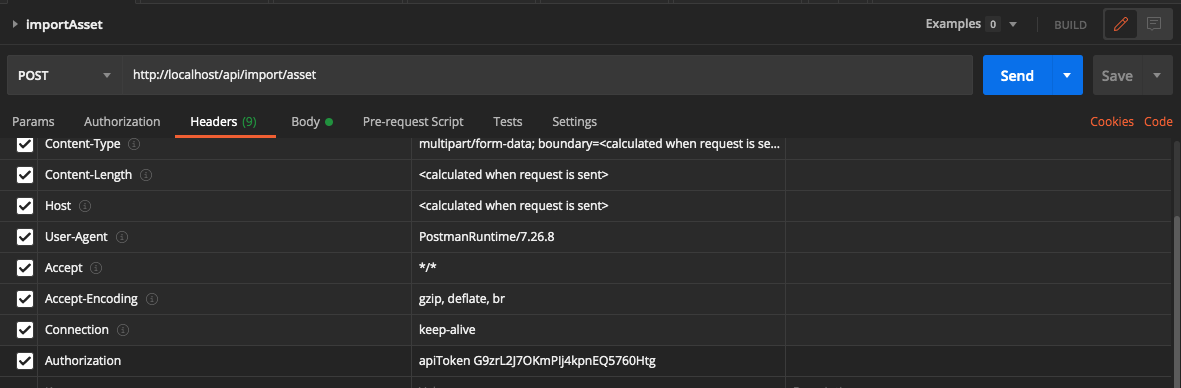
The base endpoint for all import methods is /api/import.
Import Asset
# python
import requests
from requests_toolbelt.multipart.encoder import MultipartEncoder

m = MultipartEncoder(
    fields={
        "folderId": folder_id,
        "fileName": file_name,
        "file": (file_name, open(file_path, 'rb'), 'multipart/form-data')
    }
)
headers = {
    "Authorization": "apiToken MTAxOvDXT96wSy4qwaaWqad_yeUXR3gS",
    "Content-Type": m.content_type,
}
response = requests.post("http://localhost/api/import/asset", data=m, headers=headers)
// java
// httpcore-4.4.6.jar, httpclient-4.5.3.jar, httpmime-4.5.3.jar
import org.apache.http.HttpEntity;
import org.apache.http.HttpResponse;
import org.apache.http.client.HttpClient;
import org.apache.http.client.methods.HttpPost;
import org.apache.http.entity.ContentType;
import org.apache.http.entity.mime.MultipartEntityBuilder;
import org.apache.http.impl.client.HttpClients;
import java.io.File;

...

File file = new File(filePath);
HttpEntity multipartEntity = MultipartEntityBuilder.create()
    .addTextBody("folderId", folderId)
    .addTextBody("fileName", fileName)
    .addBinaryBody("file", file, ContentType.MULTIPART_FORM_DATA, fileName)
    .build();

HttpPost httpPost = new HttpPost("http://localhost/api/import/asset");
httpPost.setHeader("Authorization", "apiToken MTAxOvDXT96wSy4qwaaWqad_yeUXR3gS");
httpPost.setEntity(multipartEntity);

HttpClient httpClient = HttpClients.createDefault();
HttpResponse response = httpClient.execute(httpPost);

int statusCode = response.getStatusLine().getStatusCode();
// typescript
import axios from 'axios';
import { readFile } from 'fs/promises';
const FormData = require('form-data');

const form: FormData = new FormData();
const file: Buffer = await readFile(filePath);
await form.append("file", file);
await form.append("folderId", folderId);
await form.append("fileName", filePath.split("/").pop());
const response = await axios.post(
    "http://localhost/api/import/asset",
    form,
    {
        headers: {
            "Content-Type": "multipart/form-data",
            "Authorization": "apiToken MTAxOvDXT96wSy4qwaaWqad_yeUXR3gS",
            ...form.getHeaders()
        },
        maxContentLength: 100000000,
        maxBodyLength: 1000000000
    }
).then(response => response).catch(e => {
    return e.response;
});
Import a new asset.
Type: POST
Endpoint: /api/import/asset
Multipart form data fields:
| Name | Type | Description |
|---|---|---|
| file | binary | The file buffer or stream |
| folderId | integer | ID of the folder the new asset is to be imported into |
| fileName | String | Name for the file |
Access level
Postman Example
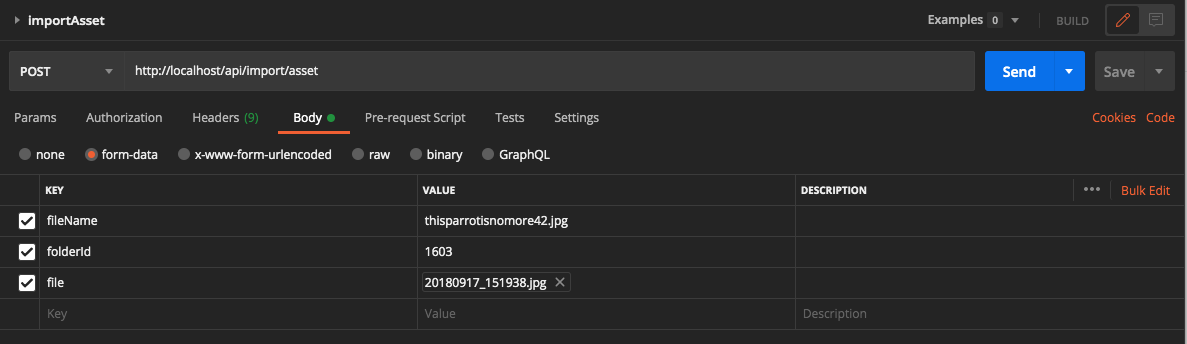
Reimport Asset
Reimport an existing asset
Type: PUT Endpoint: /api/import/asset/<assetId>
Multipart form data fields:
| Name | Type | Description |
|---|---|---|
| fileName | String | Name for the file |
Access level
Postman Example
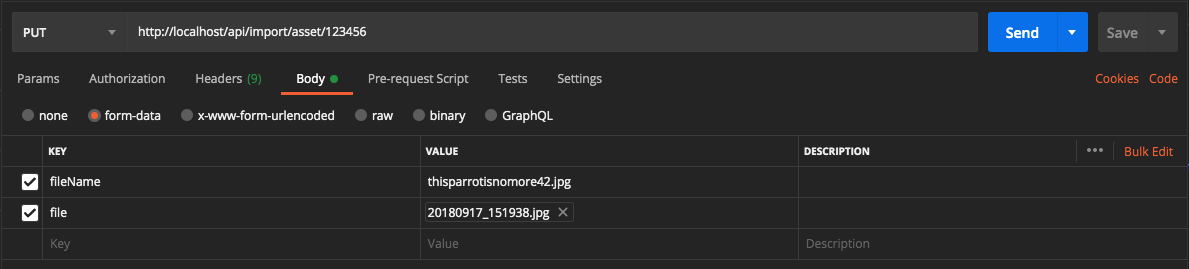
Specify ID of asset in path. For example /api/import/asset/123889
Version Asset
Locates a previously uploaded file and checks it in as a new version of the specified asset. The file for the new version MUST have already been uploaded.
Type: POST
Endpoint: /api/import/asset/<assetId>/version
Multipart form data fields:
| Name | Type | Description |
|---|---|---|
| fileName | String | Name for the file |
Access level
Postman Example
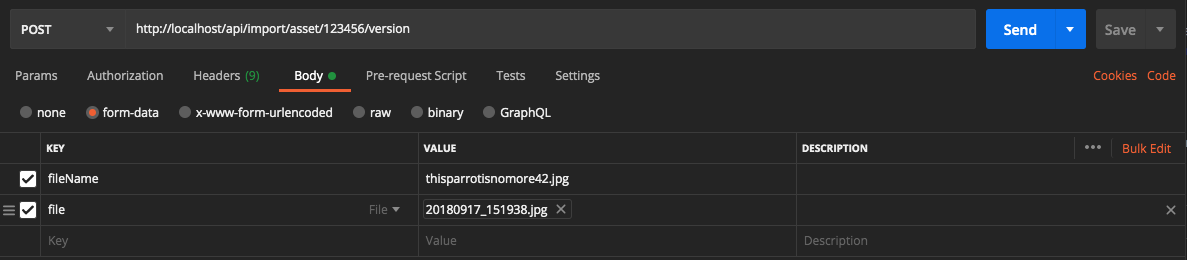
Specify ID of asset in path. For example /api/import/asset/123889/version
Import View
Add a view to an existing asset.
Type: POST
Endpoint: /api/import/asset/<assetId>/view
Multipart form data fields:
| Name | Type | Description |
|---|---|---|
| fileName | String | Name for the file |
| viewName | String | Name of the view |
| description | String | Description of the view |
Access level
Postman Example
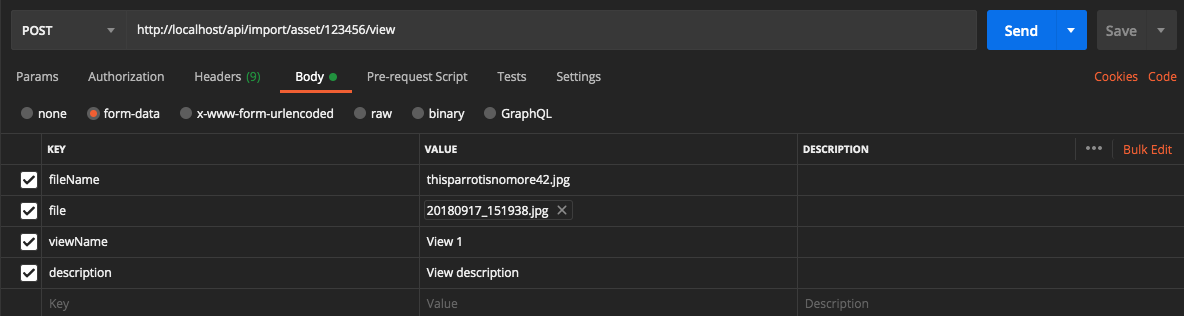
Specify ID of asset in path. For example /api/import/asset/123889/view
Reimport View
Reimport an existing view
Type: PUT
Endpoint: /api/import/view/<viewId>
Multipart form data fields:
| Name | Type | Description |
|---|---|---|
| fileName | String | Name for the file |
Access level
Postman Example
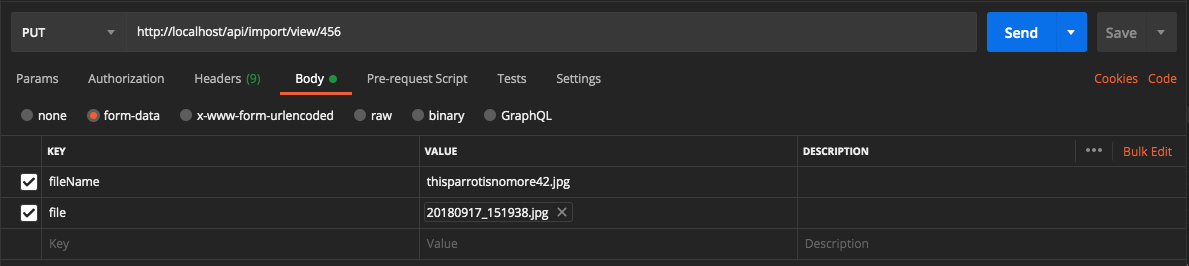
Specify ID of view in path. For example /api/import/view/98744
File Retrieval Methods
The base endpoint for all file access methods is /api/file.
Authorization is via the Authorization header. All the requests in this section require an Authorization header with a valid API token. Please see the section on Authentication for details.
File access is via a GET request, as follows:
| Resource | Path* |
|---|---|
| Asset original | /api/file/asset/<assetId> |
| Asset zoom | /api/file/asset/<assetId>/zoom |
| Asset preview | /api/file/asset/<assetId>/preview |
| Asset thumbnail | /api/file/asset/<assetId>/thumbnail |
| View original | /api/file/asset/<assetId>/view/<viewId> |
| View thumbnail | /api/file/asset/<assetId>/view/<viewId>/thumbnail |
| Version | /api/file/asset/<assetId>version/<versionId> |
| Version preview | /api/file/asset/<assetId>/version/<versionId>/preview |
| Version thumbnail | /api/file/asset/<assetId>/version/<versionId>/thumbnail |
Webhooks
NetX's webhooks notify external systems of internal events (e.g., asset imports) by sending a POST request with a JSON payload to a specified URL when the event is triggered. For information about how to create and manage webhooks, see our Webhooks article.
A webhook subscribes to one or more actions (events). The available action names are:
asset.create, asset.addToFolder, asset.checkin, asset.checkout, asset.delete, asset.expire, asset.updateAttributes, folder.create, folder.delete, folder.update, user.create, user.expire, user.update
A webhook's status is one of ACTIVE, USER_DISABLED (disabled by an administrator), or AUTO_DISABLED (disabled automatically by NetX, e.g. after repeated delivery failures). When setting a webhook you may specify ACTIVE or USER_DISABLED; AUTO_DISABLED is managed by the system and cannot be set.
setWebhook
{
    "jsonrpc": "2.0",
    "method": "setWebhook",
    "id": 20210722095312,
    "params": [
        {
            "id": 0,
            "name": "My integration webhook",
            "endpointUrl": "https://example.com/webhooks/netx",
            "actions": [
                "asset.create",
                "asset.delete"
            ],
            "status": "ACTIVE"
        }
    ]
}
{
    "id": "20210722095312",
    "jsonrpc": "2.0",
    "result": {
        "id": 12,
        "name": "My integration webhook",
        "endpointUrl": "https://example.com/webhooks/netx",
        "actions": [
            "asset.create",
            "asset.delete"
        ],
        "status": "ACTIVE"
    }
}
Creates or updates a webhook. An id of 0 (or omitted) creates a new webhook and returns it with its assigned id; a positive id updates the existing webhook with that id. The endpointUrl must be a valid http/https URL, and every entry in actions must be one of the action names listed above.
Parameters
| Parameter | Description |
|---|---|
| id | The webhook id. 0 (or omitted) creates a new webhook; a positive id updates that webhook. |
| name | A name for the webhook. |
| endpointUrl | The http/https URL that NetX will POST event payloads to. |
| actions | The list of action names the webhook subscribes to (see above). |
| status | ACTIVE or USER_DISABLED. Optional; defaults to ACTIVE. |
Data Options
None
Access level
Returns
The stored webhook object
getWebhooks
{
    "jsonrpc": "2.0",
    "method": "getWebhooks",
    "id": 20210722095312,
    "params": [
        {
            "page": {
                "startIndex": 0,
                "size": 10
            }
        }
    ]
}
{
    "id": "20210722095312",
    "jsonrpc": "2.0",
    "result": {
        "results": [
            {
                "id": 12,
                "name": "My integration webhook",
                "endpointUrl": "https://example.com/webhooks/netx",
                "actions": [
                    "asset.create",
                    "asset.delete"
                ],
                "status": "ACTIVE"
            }
        ],
        "size": 1
    }
}
Returns a page of webhooks. Results may be sorted by name (asc or desc); name is the only supported sort field, and the default is name ascending. Webhook signing secrets are never included.
Parameters
| Parameter | Description |
|---|---|
| options | page, sort (field name) |
Data Options
None
Access level
Returns
A page of webhook objects
deleteWebhook
{
    "jsonrpc": "2.0",
    "method": "deleteWebhook",
    "id": 20210722095312,
    "params": [
        12
    ]
}
{
    "id": "20210722095312",
    "jsonrpc": "2.0",
    "result": {}
}
Deletes a webhook by id.
Parameters
| Parameter | Description |
|---|---|
| webhookId | The id of the webhook to delete. |
Data Options
None
Access level
Returns
An empty object.
isWebhookEndpointUrlAccessible
{
    "jsonrpc": "2.0",
    "method": "isWebhookEndpointUrlAccessible",
    "id": 20210722095312,
    "params": [
        12
    ]
}
{
    "id": "20210722095312",
    "jsonrpc": "2.0",
    "result": true
}
Tests whether a webhook's endpoint is reachable by sending it a test payload — a live HTTP POST to the webhook's configured endpointUrl. Returns true if the endpoint responds with a 2xx status.
If the endpoint cannot be reached or responds with a non-2xx status, the call returns an error whose data describes the reason — it does not return false:
{
    "id": "20210722095312",
    "jsonrpc": "2.0",
    "error": {
        "code": 1000,
        "message": "Server error",
        "data": "Webhook endpoint test failed: Request to endpoint 'https://example.com/webhooks/netx' returned 404"
    }
}
Parameters
| Parameter | Description |
|---|---|
| webhookId | The id of the webhook to test. |
Data Options
None
Access level
Returns
true if the endpoint responded successfully; otherwise an error describing why it was not reachable.
getWebhookEventLogs
{
    "jsonrpc": "2.0",
    "method": "getWebhookEventLogs",
    "id": 20210722095312,
    "params": [
        12,
        {
            "sort": {
                "field": "eventDatetime",
                "order": "desc"
            },
            "page": {
                "startIndex": 0,
                "size": 10
            }
        }
    ]
}
{
    "id": "20210722095312",
    "jsonrpc": "2.0",
    "result": {
        "results": [
            {
                "id": "a1b2c3d4",
                "eventId": "f47ac10b-58cc-4372-a567-0e02b2c3d479",
                "eventDatetime": 1700000000000,
                "eventType": "asset.create",
                "eventJSON": "{\"event\":\"asset.create\",\"assetId\":4401}",
                "messageDatetime": 1700000000500,
                "status": "SENT",
                "statusDatetime": 1700000000600
            }
        ],
        "size": 1
    }
}
Returns a page of a webhook's delivery-log entries — one per event NetX attempted to deliver to the webhook's endpoint. The example values above are illustrative.
Each entry's status is the delivery lifecycle state: QUEUED, SENT, SCHEDULED_RETRY, or FAILED. eventJSON is the JSON payload that was POSTed to the endpoint. eventDatetime, messageDatetime, and statusDatetime are epoch milliseconds (the event time, the delivery-attempt time, and the time the status was last set). Entries may be sorted by eventDatetime, messageDatetime, statusDatetime, eventType, or status; the default is eventDatetime descending.
Parameters
| Parameter | Description |
|---|---|
| webhookId | The id of the webhook. |
| options | page, sort (see sortable fields above) |
Data Options
None
Access level
Returns
A page of webhook event-log objects
Jobs
runJob
{
    "jsonrpc": "2.0",
    "method": "runJob",
    "id": 20210722095312,
    "params": [
        "com.netxposure.products.imageportal.autotask2.impl.TestJob"
    ]
}
{
    "id": "20210722095312",
    "jsonrpc": "2.0",
    "result": {
        "progressId": "320d03c2-5fba-4702-b04e-54da15a1f1a9"
    }
}
Queues a job for background execution by its fully-qualified class name and returns an object containing the job's progress-tracking GUID.
Only jobs that have been explicitly enabled for API execution can be run. Any other class name — unknown, not a job, or a job that has not been enabled — is refused with error 4009 (INVALID_JOB). This is intentional and stricter than the internal job runner: a job that runs elsewhere in NetX is not necessarily runnable through this method.
This method passes no parameters to the job, so it is suitable only for jobs that require none.
A refused job returns:
{
    "id": "20210722095312",
    "jsonrpc": "2.0",
    "error": {
        "code": 4009,
        "message": "Invalid job"
    }
}
Parameters
| Parameter | Description |
|---|---|
| jobName | The fully-qualified class name of the job to run. |
Data Options
None
Access level
Returns
An object with a single progressId field: the progress-tracking GUID for the queued job.